devbox: Personal Makefile Extensions Without Team Conflicts
Published: Monday, Jun 29, 2026
TL;DR
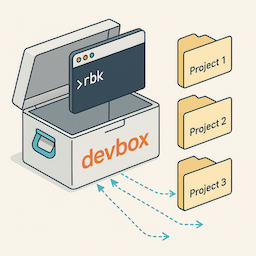
devbox is a pattern for extending project Makefiles with personal development workflows without polluting team repositories.
Key benefits:
- Personal targets (e.g.,
rbk build-proc,rbk run-main,rbk run-worker- define any targets you need) coexist with team targets (make test,make build) - No git history pollution - extensions live in separate repo, symlinked to projects
- Shared utilities (credentials, env files, scripts) across multiple services
- Zero impact on team workflow
Standardizing Makefiles across teams is good (common-make), but some requirements are too specific to personal dev flow. devbox lets you extend, not replace.
Each service gets its own devbox Makefile that you can freely customize with targets specific to that service’s architecture (event processors, workers, multiple apps, etc.).
The Problem: When Personal Needs Diverge
After standardizing build systems with common-make, I needed:
- Multiple env configs per service (
.env.test,.env.local,.env.proc) - Quick rebuilds without full test suite (
build-main,build-proc) - Shared credentials and helper scripts across 10+ microservices
- Custom environment variable loading
These are valuable for personal productivity but don’t belong in the team’s Makefile.
The Solution: devbox Pattern
devbox is a separate git repository that extends project Makefiles via symlinks:
~/Projects/company/
├── devbox/                    # Personal tooling repo
│   ├── Makefile_devbox        # Common devbox targets
│   ├── _scripts/              # Shared utilities
│   │   ├── env-args.sh        # Load env files (key utility!)
│   │   ├── db-tunnel.sh       # SSH tunnel to remote DB
│   │   ├── get-credentials.sh # Fetch from secret store
│   │   └── jwt-decode.sh      # Debug auth tokens
│   ├── service-a/             # Per-service customization
│   │   ├── Makefile           # Service-specific devbox targets
│   │   ├── .env               # Local environment config
│   │   └── .env.proc          # Event processor config
│   └── service-b/
│       ├── Makefile
│       └── .env
│
├── service-a/
│   ├── Makefile               # Team's standard Makefile
│   └── .devbox -> ../devbox   # Symlink (gitignored)
│
└── service-b/
    ├── Makefile
    └── .devbox -> ../devbox
How It Works
1. The rbk Alias
Add to your shell profile (~/.zshrc or ~/.bashrc):
alias rbk='f(){ (cd . && make -f .devbox/$(pwd | xargs basename)/Makefile "$@"); unset -f f; }; f'
2. Three-Layer Makefile Architecture
Example:
# In devbox/service-a/Makefile

include .devbox/Makefile_devbox        # Layer 1: Common devbox targets
include $(CURR_DIR)/Makefile           # Layer 2: Team's standard Makefile

## Layer 3: Service-specific devbox targets

EVENT_PROCESSOR_NAME := event-processor
EVENT_PROCESSOR_DIR := ./cmd/$(EVENT_PROCESSOR_NAME)

.PHONY: build-proc
build-proc: ## Build event-processor (no tests)
    CGO_ENABLED=0 go build $(BUILD_FLAGS) -ldflags="$(LINK_FLAGS)" \
        -o build/$(EVENT_PROCESSOR_NAME) $(EVENT_PROCESSOR_DIR)

.PHONY: run-proc
run-proc: build-proc  ## Run event-processor with .env.proc
    $(shell $(DBOX_DIR_NAME)/_scripts/env-args.sh \
        $(DBOX_DIR_NAME)/$(SUB_DUR)/.env.proc) \
        build/$(EVENT_PROCESSOR_NAME) consume --adapter nakadi
Result: You get both team targets (make test) and personal targets (rbk run-proc).
Each service can have completely different devbox targets based on its architecture. One service might have build-proc and run-proc for event processing, another might have build-worker for background jobs, or build-cli for command-line tools. You define whatever makes sense for each service.
3. Environment File Loading: env-args.sh
The key utility - dead simple env file loader without overengineering:
#!/bin/bash
# devbox/_scripts/env-args.sh

ENV_FILE_PATH=$1
env cat $ENV_FILE_PATH | egrep -v "(^#.*|^$)" | xargs -0 | tr '\n' ' '
Usage in Makefile:
run-proc: build-proc
    $(shell .devbox/_scripts/env-args.sh .devbox/service-a/.env.proc) \
        build/event-processor consume
Setup Instructions
Initial Setup
-
Create devbox repository:
cd ~/Projects/company mkdir devbox && cd devbox git init -
Create base structure:
Create
Makefile_devbox:.DEFAULT_GOAL := help CURR_DIR := $(shell pwd) DBOX_DIR_NAME := .devbox SUB_DUR := $(shell pwd | xargs basename) .PHONY: env env: ## Show environment info @echo CURR_DIR=$(CURR_DIR) @echo DBOX_DIR_NAME=$(DBOX_DIR_NAME) $(shell env cat $(DBOX_DIR_NAME)/$(SUB_DUR)/.env | xargs -0)Create
_scripts/env-args.sh:#!/bin/bash ENV_FILE_PATH=$1 env cat $ENV_FILE_PATH | egrep -v "(^#.*|^$)" | xargs -0 | tr '\n' ' 'chmod +x _scripts/env-args.sh -
Add
rbkalias:echo "alias rbk='f(){ (cd . && make -f .devbox/\$(pwd | xargs basename)/Makefile \"\$@\"); unset -f f; }; f'" >> ~/.zshrc source ~/.zshrc
Add Service to devbox
For each service you want to extend:
cd ~/Projects/company/devbox
mkdir service-a
Create service-a/Makefile:
include .devbox/Makefile_devbox
include $(CURR_DIR)/Makefile

APP_NAME := app
APP_DIR := ./cmd/$(APP_NAME)

.PHONY: build-main
build-main: ## Build main app (no tests)
    CGO_ENABLED=0 go build $(BUILD_FLAGS) -ldflags="$(LINK_FLAGS)" \
        -o build/$(APP_NAME) $(APP_DIR)

.PHONY: run-main
run-main: build-main  ## Run with .env
    $(shell $(DBOX_DIR_NAME)/_scripts/env-args.sh \
        $(DBOX_DIR_NAME)/$(SUB_DUR)/.env) build/$(APP_NAME)
Create service-a/.env:
# Local development environment
DB_HOST=localhost
DB_USER=postgres
DB_PASSWORD=postgres
DB_NAME=service_a_test
ADDRESS=localhost:8080
ENABLE_TRACING=true
Link from service to devbox:
cd ~/Projects/company/devbox
ln -s $(pwd) ~/Projects/company/service-a/.devbox
Verify Setup
cd ~/Projects/company/service-a

# Test team's standard targets (still work!)
make test
make build

# Test devbox targets
rbk help        # Shows both team and devbox targets
rbk env         # Shows your custom environment
rbk build-main  # Quick build without tests
rbk run-main    # Run with your .env
When NOT to Use devbox
Don’t use devbox for:
- Targets that everyone on team needs (add to team Makefile)
- Production deployment logic (belongs in team’s CI/CD)
- Anything that should be standardized across team
DO use devbox for:
- Personal iteration shortcuts
- Local-only configurations
- Development convenience targets
- Cross-service helper scripts
Conclusion
devbox lets you extend standardized Makefiles without forcing personal preferences on the team. Standardize the foundation, extend where workflows diverge.
References
Related Blog Posts
- common-make: Zero-Setup Build Automation for Go Services
- Standardizing Go Build Systems Across 15 Microservices with Claude Code
Key Files
devbox/Makefile_devbox- Common devbox targetsdevbox/_scripts/env-args.sh- Simple env file loaderdevbox/<service>/Makefile- Per-service extensions